



Presentation Creation
Quick Summary / Key Takeaways
- AI acts as your creative partner, helping you turn rough ideas, outlines, or existing content into polished, dynamic pitch decks in minutes.
- You create custom, visually engaging presentations that go beyond static templates, making it easier to capture attention and stand out with investors.
- Strong design and clear structure boost your confidence, so you can focus on telling a compelling story instead of worrying about layout or visuals.
- Motion and visual flow guide your audience through complex ideas, helping them understand your vision quickly and remember what matters most.
- By letting AI handle design decisions and visual execution, you stay focused on your message, your narrative, and delivering your pitch with impact.
Introduction
AI for pitch decks changes how founders and teams turn ideas into investor-ready presentations. Instead of starting from a blank screen or forcing your story into rigid templates, AI helps you move fast from rough concepts to a clear, visually engaging pitch. You bring the vision, the goals, and the content. AI handles structure, design flow, and visual impact so your message comes through with clarity and confidence.
For founders, sales teams, and entrepreneurs, time and attention are always in short supply. Investors decide quickly, which means your pitch needs to communicate value, momentum, and direction without friction. AI for pitch decks acts like a creative partner, shaping your narrative, guiding attention with motion and flow, and transforming static slides into dynamic presentations that feel intentional and memorable.
In this guide, you’ll learn how AI helps you build pitch decks faster, tell a stronger story, and stay focused on what matters most: your idea and how you deliver it. If you’re ready to explore what this looks like in practice,
Prezi AI
shows how AI-powered design can help pitches stand out without adding complexity.
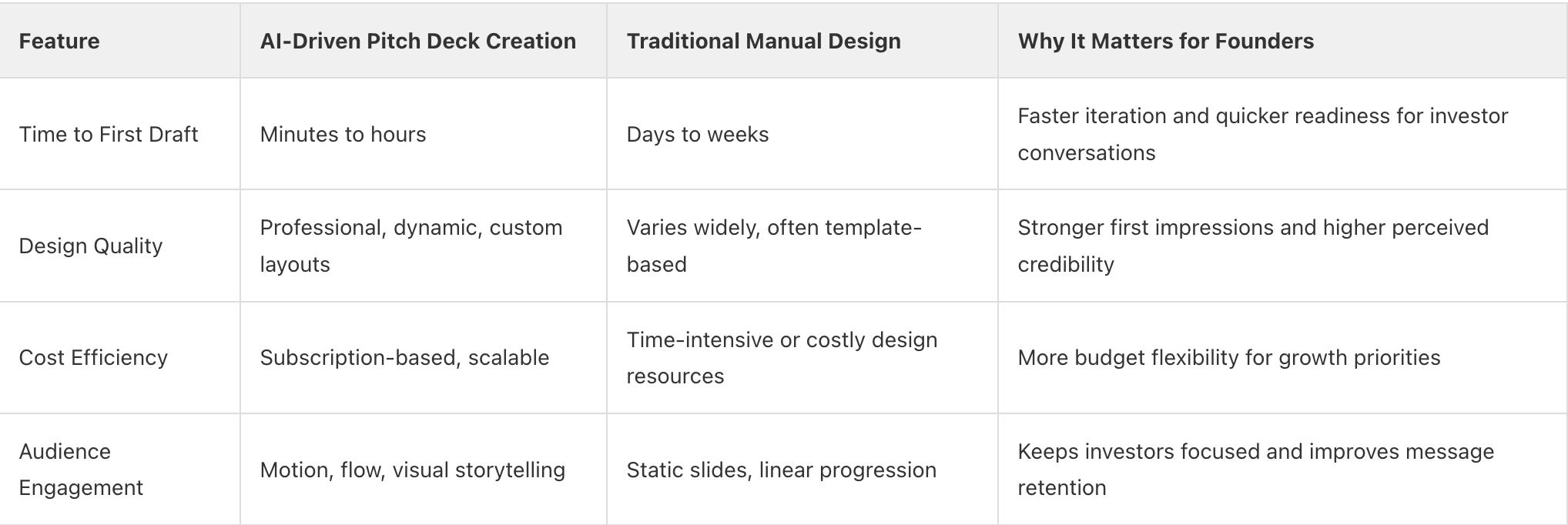
AI Pitch Deck Creation vs. Traditional Design Approaches
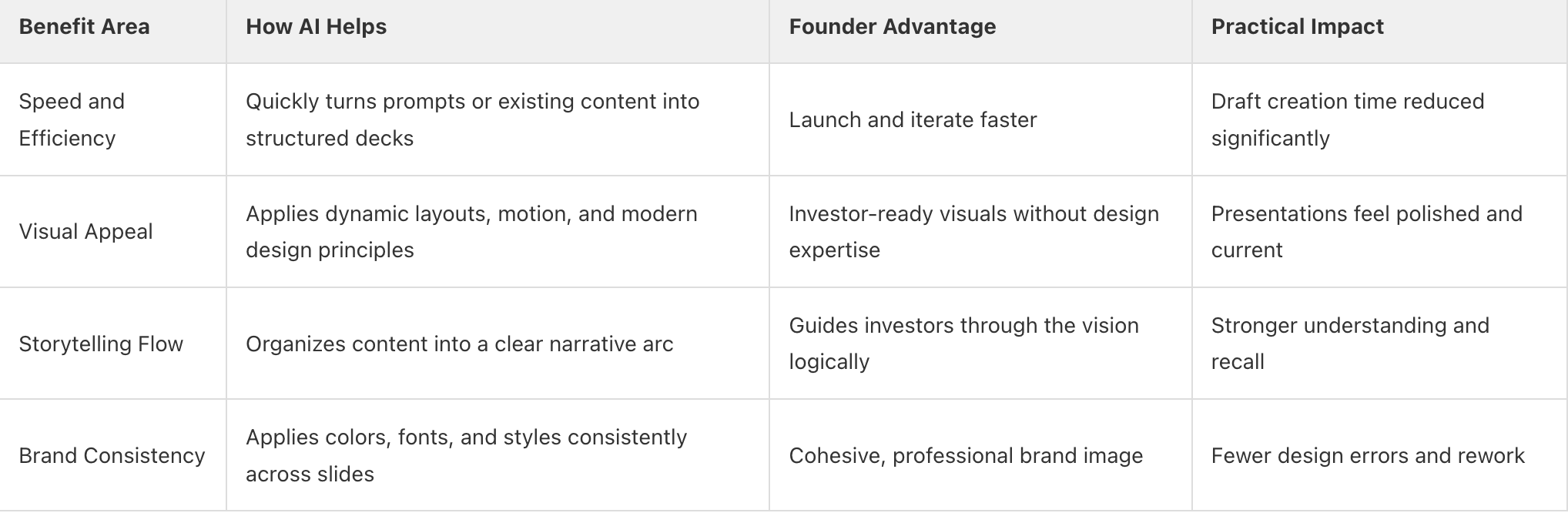
Key Benefits of Using AI for Pitch Decks
Pitch Deck Setup Checklist (Before Using AI)
- Clarify your core message, value proposition, and key selling points.
- Gather essential inputs such as market data, traction metrics, financial highlights, and supporting visuals.
- Prepare concise prompts or structured content that clearly explain your problem, solution, and audience.
- Generate an initial deck and review the overall structure, flow, and visual impact before moving forward.
Pitch Deck Optimization Checklist (After Presentation or Review)
- Collect immediate feedback from investors, judges, or stakeholders while impressions are fresh.
- Identify which sections captured attention and where clarity or emphasis can improve.
- Refine content, visuals, and narrative flow to strengthen weak areas and sharpen key messages.
- Finalize, save, and share an updated version of your pitch deck for future investor conversations.
Frequently Asked Questions
Section 1: UNDERSTANDING AI FOR PITCH DECKS
FAQ 1: What is AI for pitch decks and how does it work?
AI for pitch decks helps you turn ideas, outlines, or existing materials into a clear, investor-ready presentation faster.
You begin by entering a prompt or uploading content, and the AI generates a structured outline that organizes your story before design starts. This keeps the focus on narrative clarity, making it easier to present your problem, solution, and vision in a logical, compelling flow.
Once the structure is set, the AI supports layout, visual flow, and motion to bring your story to life. Instead of relying on static slides, it connects ideas visually and allows flexible navigation during live pitches. You stay in control of the message and edits, while the AI reduces manual design work and speeds up the path from concept to confident delivery.
Takeaway: AI for pitch decks helps you structure ideas quickly and create dynamic, investor-ready presentations while keeping full control of your story.
FAQ 2: How does AI transform static slides into dynamic presentations?
Prezi AI transforms boring slides into dynamic presentations. Instead of forcing ideas into rigid slides, it organizes your message using enhanced dynamic and spatial layout so related points visually connect. This creates a natural flow where the audience follows your narrative through zooming views and smooth transitions rather than clicking through disconnected slides.
It also supports this motion driven storytelling with smart layout decisions, premium visual assets, and automated visual structure that adapts as you edit. You stay in control of the message while AI handles visual pacing, movement, and emphasis, helping your pitch feel more engaging, more intuitive, and easier to follow in live investor conversations.
Takeaway: AI turns static slides into dynamic presentations by using motion, visual connections, and structured story blocks to guide attention and strengthen your pitch narrative.
FAQ 3: What kind of input does AI need to create a great pitch deck?
To create a strong pitch deck, AI needs clear, structured input that defines your story before design begins.
This includes your core idea, target audience, problem and solution, market opportunity, business model, and any key data you want to highlight. You can start with a short prompt, a written outline, or upload existing content such as a document or presentation file to give the AI meaningful context.
You’ll get better results when you also share tone preferences, brand elements, or visual priorities. With well defined input, the AI can organize your narrative into a logical flow, apply visual structure, and build a dynamic presentation that highlights what matters most. You stay in control of the message while the AI handles layout, pacing, and visual emphasis.
Takeaway: Clear, structured input like your core story, key data, and visual preferences helps AI generate a focused, investor ready pitch deck.
Section 2: BENEFITS FOR FOUNDERS AND TEAMS
FAQ 4: How does AI save time in pitch deck creation?
AI saves time by eliminating the manual steps that slow pitch deck creation down. You can start with a short prompt, a structured outline, or uploaded files such as PPTX, PDF, or DOCX, and the AI immediately generates a clear narrative structure before design begins. Instead of building slides one by one, the content is organized into a logical flow that highlights the problem, solution, and opportunity from the start.
Design work is also accelerated. Layouts, visuals, and motion are applied automatically across a dynamic canvas, while built in tools refine text, suggest visuals, and keep branding consistent without repeated adjustments. Features like instant visual libraries, automated layout updates, and PowerPoint conversion remove the need for reformatting, allowing you to reach a polished, investor ready draft in minutes rather than days.
Takeaway: AI speeds up pitch deck creation by automating structure, design, and visual flow, so you can focus on refining your story and preparing for investors.
FAQ 5: Can AI help improve the visual appeal of my pitch deck?
Yes. AI can significantly improve the visual appeal of your pitch deck by applying proven design principles as you build. It organizes content into clear visual hierarchies, creates layouts that support your narrative, and uses motion and spatial flow to guide attention. Instead of static slides, ideas connect on an open canvas, helping investors follow your story naturally and stay focused on what matters.
AI also helps maintain visual consistency through smart use of color, typography, and high quality visuals. Features like enhanced story blocks, premium imagery, advanced image editing, and dynamic transitions make each deck feel intentional and polished rather than template driven. The result is a presentation that looks professional, feels cohesive, and keeps your audience engaged from start to finish.
With Prezi AI, you can generate your own custom images with the AI image generator, giving you even more visual options to choose from.
Takeaway: AI enhances pitch deck visuals with dynamic layouts, consistent branding, and cinematic motion that make your story clearer, stronger, and more memorable.
FAQ 6: Does AI ensure brand consistency across all slides?
Yes. AI helps keep your pitch deck visually consistent by applying your brand elements across every frame from the start.
Once you add assets like your logo, color palette, and typography, those choices carry through layouts, visuals, and story blocks automatically. This removes the risk of mismatched colors, uneven styling, or slides that feel disconnected.
Instead of manually fixing branding on every slide, you can focus on shaping your message while the design stays aligned.
Takeaway: AI maintains brand consistency by automatically applying your visual guidelines across the entire pitch deck, saving time and reinforcing a professional, cohesive look.
FAQ 7: How does AI assist in crafting a compelling narrative?
AI assists in crafting a compelling narrative by first turning your ideas or uploaded content into a structured outline before any visual design begins. This outline helps organize your pitch into a clear progression such as problem, solution, market opportunity, and vision so your story makes sense from the first moment. You can easily rearrange sections to refine the flow, making sure each point builds naturally on the last.
Once the structure is set, AI provides a natural flow through visual connections. Instead of forcing ideas into rigid slides, it links related concepts visually and uses movement to guide attention as you present. This allows you to zoom into details, pull back to show the bigger picture, and adapt the story in real time while keeping the narrative clear and engaging.
Takeaway: AI helps you craft a stronger pitch narrative by structuring your story first, then using visual flow and motion to guide your audience through it clearly and memorably.
Section 3: PRACTICAL APPLICATIONS AND USE CASES
FAQ 8: What are common use cases for AI-generated pitch decks?
Common use cases for AI-generated pitch decks include fundraising for startups, sales presentations for new products, and internal strategy meetings. Founders rely on them to build investor ready decks for fundraising rounds, using prompts or uploaded outlines to quickly structure key sections like problem, solution, market opportunity, and traction. This makes it easier to move fast without sacrificing narrative flow or visual quality.
Sales and internal teams also use AI generated decks to tailor presentations for different audiences. Sales teams create customized pitches for specific prospects, while leadership teams use them for strategy reviews, training sessions, and project updates. By handling structure, layout, and visual flow automatically, AI helps teams deliver polished, attention grabbing presentations without spending hours on manual design.
Takeaway: Use AI generated pitch decks for fundraising, sales, and internal communication when you need clear, professional presentations fast without design bottlenecks.
FAQ 9: Can AI adapt pitch decks for different audiences or purposes?
Yes, AI can adapt pitch decks for different audiences by letting you quickly reshape content and structure without starting over. You can revise the focus of a deck by updating prompts or adjusting sections to emphasize what matters most, whether that’s financial traction for investors, product depth for technical stakeholders, or outcomes for partners. The AI reorganizes the narrative, updates visuals, and refines language so the story stays clear and relevant to the audience.
This approach makes it easy to reuse a single core presentation across multiple contexts. Instead of rebuilding slides manually, you refine direction and let the AI handle layout, visual flow, and pacing. You stay in control of the message while cutting down the time it takes to create tailored, attention grabbing pitch decks.
Takeaway: Use AI to quickly tailor one pitch deck for multiple audiences by adjusting focus, structure, and visual emphasis without rebuilding from scratch.
FAQ 10: How does AI handle data visualization in pitch decks?
AI handles data visualization by helping you turn numbers and key metrics into clear, visual stories that are easy to understand and remember. When you add data points, charts, or performance highlights, the AI supports layout and visual structure, helping you present information using clean charts, visual lists, and infographics that fit naturally into your narrative. This keeps the focus on clarity and impact, not manual formatting.
With AI support, your data stays visually consistent with the rest of your pitch deck and works seamlessly within a dynamic presentation flow. You can refine visuals, adjust emphasis, and update numbers as needed, while the AI helps maintain balance, spacing, and visual hierarchy. The result is data that feels integrated into the narrrative.
Takeaway: Transform raw spreadsheets into clear, professional visualizations automatically.
FAQ 11: Is it possible to integrate existing content into an AI-generated deck?
Yes, you can integrate existing content into an AI-generated deck by uploading your files or pasting in your material at the start. You can bring in text, images, and full documents such as PPTX, PDF, or DOCX files, and the AI uses that content to build a structured outline before design begins. This ensures your original message stays intact while the presentation is reorganized into a clear, investor-ready story.
From there, the AI helps transform your existing content into a dynamic presentation by supporting layout, visual flow, and structure across an open canvas. You stay in control and can edit, rearrange, or refine any part of the deck, while the AI reduces manual design work and helps your content feel cohesive, polished, and engaging.
Takeaway: Upload your existing files or content to quickly turn past materials into a structured, dynamic pitch deck without starting from scratch.
Section 4: OPTIMIZING YOUR AI PITCH DECK
FAQ 12: What are the best practices for refining an AI-generated pitch deck?
The best way to refine an AI-generated pitch deck is to start with the structure the AI creates and evaluate how clearly your story flows from problem to solution to opportunity. Review the outline first, then tighten headlines, simplify language, and remove anything that doesn’t directly support your investor narrative. Fact-check all data, confirm assumptions, and make sure each section earns its place. AI gives you a strong foundation, but clarity and relevance come from deliberate human review.
Next, personalize the deck make the presentation feel uniquely yours. Apply your logo and color palette, swap in your own charts or images where needed. Finally, rehearse using presenter tools to adjust pacing and visual emphasis, ensuring the deck supports confident delivery and keeps investors focused on what matters most.
Takeaway: Refine AI-generated pitch decks by tightening the story, verifying data, applying consistent branding, and rehearsing delivery so the final presentation feels clear, confident, and investor-ready.
FAQ 13: How can I add a human touch to an AI-created presentation?
You add a human touch to an AI created presentation by pairing AI driven structure and design with your own voice, perspective, and real experiences.
Begin by reviewing the suggested narrative and adjusting the language so it sounds natural and conversational. Highlight moments that reflect your motivation, decisions, or customer insight since these are details only you can provide.
Use the generated visuals and motion as a starting point, then personalize them by refining imagery, pacing, and emphasis to support your story. When AI manages layout, flow, and visual consistency, you can focus on presence and delivery. This balance creates a presentation that feels polished yet personal, helping your message connect and stay memorable.
Takeaway: Use AI for structure and visuals, then add your voice, stories, and real context to create a genuine connection with your audience.
FAQ 14: What role does motion and flow play in AI pitch decks?
Motion and flow are central to how AI powered pitch decks keep investors engaged and focused.
AI uses a dynamic canvas to connect ideas visually, guiding attention through smooth zooming and transitions. This approach helps you show how problems, solutions, and outcomes relate to each other, making complex information easier to understand and remember.
By controlling pacing and visual movement, AI reduces cognitive overload and keeps your audience oriented throughout the pitch. You can move freely between sections, zoom in on details when questions come up, and maintain a clear narrative without breaking momentum. The result is a pitch that feels cinematic, intentional, and memorable.
Takeaway: Use AI driven motion and visual flow to guide attention, clarify your story, and create an investor pitch that feels immersive and easy to follow.
FAQ 15: How do I ensure my AI pitch deck truly captivates investors?
You captivate investors by pairing clear storytelling with visuals that move and guide attention. Start with a sharp hook, then use AI to structure your pitch into a logical flow that highlights the problem, solution, traction, and opportunity in a way that is easy to follow. Motion and visual connections help investors understand how ideas relate, making complex points feel intuitive instead of overwhelming.
To elevate the impact, refine the language so it sounds like you, validate all numbers and claims, and keep visuals focused on supporting the story rather than distracting from it. Practice navigating the presentation confidently, using smooth transitions to emphasize key moments. When strong narrative, dynamic visuals, and confident delivery come together, your pitch feels polished, memorable, and investor ready.
Takeaway: Combine clear storytelling, purposeful motion, and confident delivery to turn an AI generated pitch deck into an experience investors remember.
Section 5: FUTURE OF PITCHING WITH AI
FAQ 16: What's next for AI in presentation and pitch deck technology?
AI in presentation and pitch deck technology is moving toward deeper personalization, faster creation, and more responsive storytelling. Instead of starting from rigid templates, you’ll see AI use an advanced AI model to turn ideas, outlines, or uploaded files into custom presentations even faster, while applying proven design principles automatically. Expect smarter guidance during creation, with AI helping you refine structure, visuals, and messaging as you build, so every presentation feels intentional and investor ready.
Looking ahead, presentations will become more adaptive and interactive. AI will increasingly support flexible navigation, richer visual connections, and clearer insight into what resonates through built-in analytics and viewer behavior signals. The goal is not to replace the presenter, but to help you respond with confidence, adjust emphasis, and deliver more engaging, attention-grabbing presentations that feel like conversations rather than static decks. This is where platforms like Prezi are already setting the direction by combining cinematic motion, non linear storytelling, and AI guided design.
Takeaway: The future of AI powered pitching is faster creation, smarter design guidance, and more adaptive presentations that help you engage investors with confidence.